
Spam E-mail: What It Is and How to Protect Yourself
In short: Spam is unsolicited bulk e-mail: advertising, chain letters, fake charity appeals and phishing e-mails that try to steal passwords. Do not forward chain mails, do not click unknown links or attachments, and mark suspicious messages as spam.
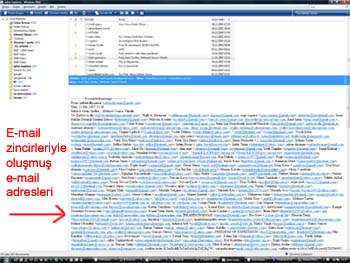
Examples of spam
- “The more people you forward this to, the more money a sick child receives.”
- “Send this to 15 people or bad luck will follow.”
- Fake virus warnings.
- Phishing mails pretending to be your bank, courier or e-mail provider asking for passwords or card details.
Their purpose is to harvest addresses, fill mailboxes with ads or steal personal data. Every time you forward a chain mail you hand your address and everyone else’s to spammers.
What to do against spam
- Do not forward chain mails; if you must, put recipients in BCC.
- Do not click unknown links or attachments (.zip, .exe, macro-enabled Office files).
- Mark messages as spam so your filter learns.
- Use unsubscribe links only for companies you trust.
- Block specific senders with a blacklist.
- Do not publish your e-mail address as plain text on websites.
Want company e-mail with spam filtering?
Company E-mail Prices
Company E-mail Prices
Frequently asked questions
What is spam e-mail?
Unsolicited bulk e-mail such as ads, chain letters, fake appeals and phishing.
Why should I not forward chain mails?
They are used to harvest addresses; each forward exposes your and your recipients’ addresses to spammers.
How do I recognise phishing?
Inconsistent sender address, urgent requests, demands for passwords or card details and links that do not point to the real organisation’s domain.


Comments (0)