
BlackBerry E-mail Setup
iPhone Mail SetupAndroid E-mail SetupWebmail Login
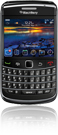
Enter the following information in the BlackBerry e-mail setup:
- Account type: POP3/IMAP
- E-mail address: [email protected]
- User name: [email protected]
- Password: ****** (hidden for security)
- Mail server: your mail server name
Check your details. For help finding the right information see the notes below; after confirming them, sign in to the BlackBerry Internet Service site and try again.
POP and IMAP accounts
Internet service provider e-mail accounts are usually POP or IMAP accounts. You need your e-mail address, server, user name (your full e-mail address) and password. You can get this information from your desktop e-mail program or your provider.
If you don’t want to deal with settings, you can send and receive mail through webmail in your phone’s browser with your e-mail address and password.
SSL/TLS settings for ASO Web mail servers
If your e-mail is hosted on ASO Web servers, the settings shown in the steps above (mail.yourdomain.com, ports 110/587 without encryption) still work. To set up your e-mail with an encrypted SSL/TLS connection, use:
| Incoming / outgoing server | smaug.aso.com.tr |
| IMAP | port 993, SSL/TLS |
| POP3 | port 995, SSL/TLS |
| SMTP (outgoing) | port 465, SSL/TLS, authentication required |
| User name | your full e-mail address |
Company E-mail Prices


Comments (0)