
Data Matrix (Karekod) for Pharmacies and the Medical Sector
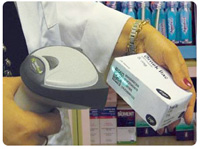
What is the Turkish “karekod”?
“Karekod” is the Turkish name for the Data Matrix barcode used on medicine packs. It is a square or rectangular 2D barcode that stores a lot of data in a small area and can still be read when partly damaged thanks to error correction, which is why it was chosen for unit-level tracking of medicines in İTS. (In everyday Turkish, QR codes are sometimes also called karekod, but medicines use Data Matrix.)
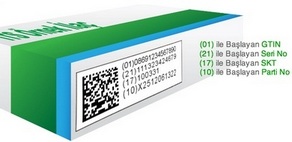
What data does a pharmaceutical Data Matrix contain?
| GS1 Application Identifier | Data | Example |
|---|---|---|
| (01) | GTIN – 14-digit product number (EAN-13 with a leading 0) | 08691234567890 |
| (21) | Serial number – unique per pack | A1B2C3D4 |
| (17) | Expiry date (YYMMDD) | 281231 |
| (10) | Batch / lot number | L2026A |
With this data every pack can be tracked from production to the patient. İTS is operated by the Turkish Medicines and Medical Devices Agency (TİTCK); medical devices and cosmetics are tracked in the Product Tracking System (ÜTS).
Creating a single Datamatrix code in Barcode Label Pro
- Install and run Barcode Label Pro.
- Choose the DATAMATRIX tool in the toolbox on the left (its name appears on hover).
- Click on the label and double-click the barcode that appears.
- In the Source section choose Screen, type the data to encode and click OK.
- Preview and print. You can test the code on screen with a phone camera or a 2D scanner before printing.
Printing Datamatrix codes in bulk from Excel or a database
- Click Settings > Data connection, choose the file type (e.g. Excel) and click Next.
- Browse to your table and click OK once it is displayed.
- Add a Datamatrix code with the DATAMATRIX tool and double-click it.
- In Source choose Database and select the field to encode.
- To put several fields into one code, open the formula builder in Script and join them with
&:DATA.FIELD1 & DATA.FIELD2. - Check in preview and print one label per row.
Pricing and Purchase (TR)Download the Trial
Why Barcode Label Pro?
- Easy drag-and-drop label design with hundreds of ready-made label templates.
- 42 barcode standards including Datamatrix, QR, EAN-13, Code 128 and Code 39.
- Bulk printing from Excel, Access, SQL and ODBC; dates, counters, formulas, logos and photos.
- Prints on A4 laser label sheets and roll barcode printers.
- Technical support by phone.
Related: Datamatrix barcode usage · Barcode standards · Sample Datamatrix label
Frequently asked questions
What is the pharmaceutical karekod in Turkey?
It is a GS1 Data Matrix 2D barcode on medicine packs containing the GTIN, a unique serial number, expiry date and batch number, used in Turkey’s Pharmaceutical Track and Trace System (İTS).
Since when is Data Matrix mandatory on medicines in Turkey?
Under İTS, Data Matrix coding of medicinal products has been mandatory since 1 January 2010.
Is karekod the same as a QR code?
No. Medicines use Data Matrix. A QR code is also a 2D barcode but has a different structure; in everyday Turkish both may be called karekod.
Which software can print Data Matrix labels?
Barcode Label Pro supports 42 barcode standards including Data Matrix and prints labels one by one or in bulk from Excel.
Can a Data Matrix contain several data fields?
Yes. In Barcode Label Pro join fields with & in the Script section to encode GTIN, serial, expiry and batch in one code.


Comments (0)